Every business and organization in Central Texas—from Brownwood to San Angelo, Stephenville to Harker Heights—depends on its multifunction printer or copier. You print invoices, scan lesson plans, copy church hymnals, or produce client proposals. When the machine works, it fades into the background. When it doesn’t, everything slows down.

Older equipment often reaches a tipping point where the costs, frustrations, and risks quietly outweigh the benefits of keeping it. Here are the clearest signs it’s time to upgrade to a modern Canon or Lexmark multifunction device.

1. Frequent Paper Jams, Error Codes, or “Out of Order” Moments

If your team is clearing jams several times a week or staring at cryptic error messages, the machine is spending more time offline than productive. Modern multifunction devices from Canon and Lexmark are engineered for higher duty cycles and far fewer interruptions—especially when paired with proactive local service.
2. Slow Speeds That Frustrate Staff and Customers

Waiting for multi-page jobs, large color documents, or duplex printing to finish wastes time. Newer models deliver significantly higher pages-per-minute rates, faster first-page-out times, and better handling of mixed media. The difference is noticeable the first busy morning you use one.

3. Rising Toner, Ink, and Repair Bills

When supply costs climb or service calls become routine, the total cost of ownership is usually higher than a new, more efficient machine. Today’s devices use less energy, produce less waste, and often come with managed-supply options so you never scramble for toner again.

4. Limited Features Holding Back Productivity

Can your current machine easily:

  • Scan to folder, email, or cloud?
  • Support mobile or wireless printing?
  • Offer secure print release?
  • Integrate with document capture and workflow software?

If the answer is no (or “only with workarounds”), you’re missing tools that save hours every week. Kirbo’s Office Systems provides Canon and Lexmark multifunction devices plus software for output management, document capture/distribution, mobile solutions, information management/workflow, and device management.

5. Security Concerns or Compliance Risks

Older hard drives can retain sensitive data. Unsecured print jobs sitting in the output tray create exposure. Modern devices include hard-drive overwrite options, user authentication, and secure release features that protect invoices, student records, patient information, or confidential contracts.

 
6. Your Business Has Grown (or Changed)

A machine that worked fine for a five-person office may struggle with higher volumes, color needs, or wide-format requirements. Schools, churches, law firms, real-estate offices, and growing SMBs across Central Texas often discover their current equipment no longer matches their actual workflow.

7. You’re Spending Too Much Staff or IT Time on Printer Issues

When employees or IT staff regularly order supplies, troubleshoot network problems, or wait on hold for remote support, that time is pulled away from higher-value work. Local, on-site technicians and a simple online portal change that equation.

Why Upgrade with a Local, Family-Owned Dealer?

Kirbo’s Office Systems has served the heart of Texas since 1972. As an authorized Canon and Lexmark dealer with four Central Texas locations, we focus on the results that matter most:

  • Spend less money
  • Have less downtime
  • Be more productive
  • Never worry about ink or toner again

Our well-trained technicians provide on-site service, our eInfo portal makes ordering toner and managing bills simple, and our team helps right-size equipment and software to your actual needs—whether you buy, lease, or prefer a fully managed solution.

Ready to See What an Upgrade Could Look Like?

A free, no-obligation assessment is the easiest next step. We’ll look at your current equipment, usage, pain points, and costs, then show you practical options that fit your budget and workflow.

Call the location nearest you or visit www.kirbos.com today:

    • Brownwood: 325-643-3383

    • Harker Heights: 254-526-6182

    • San Angelo: 325-658-2679

    • Stephenville: 254-968-4221

Family-owned and serving Central Texas since 1972. Authorized Canon and Lexmark dealers. 

Don’t let an aging copier quietly drain time, money, and productivity. Upgrade once—and get back to focusing on your business.

Every business in Central Texas—from Brownwood to San Angelo, Stephenville to Harker Heights—relies on printers and copiers. You print invoices, scan contracts, copy training materials, or produce church bulletins and…

Aw, Come On! I Wanted A JPEG, Not A PDF!

It’s a busy day, with piles of work stacking up in front of you. With each addition to the load, you can almost feel the hair on your head turning gray.

To get started, you pick up a stack of images you need to scan to your editor before they can be placed in your newsletter. You take the images over to your new imageRUNNER ADVANCE and scan one in, making sure to select the file type .jpg in the process. So far, so good. Then, as you start to scan in the next one, you notice the settings have reverted back to .pdf. No problem, you think to yourself as you reselect .jpg.

However, when you begin to scan in the third image, it’s back to .pdf. “NNNOOOOOOOO!” you cry out in anguish. You grab the bat you conveniently keep next to the copier, and then proceed to go Office Space on the new imageRUNNER. Your fantasy is interrupted by a quickly developing headache playing a drum solo on your frontal lobe. You place your forehead in your hand and shake your head slowly, with a sigh.

Before you decide to use your copier as a piñata, follow these simple instructions to make your preferred settings the default on your new imageRUNNER ADVANCE.


On the Main Menu, select Scan and Send.

On the next screen, select the File Format box.

The File Format screen will have the default file format pre-selected.

Select your preferred file format and then press OK.

On the next screen, press the image of the cube in the top right corner.

On the following menu, select Change Default Settings.

This last screen will display the settings you just changed. Simply press Yes to continue.

That’s it! Finito! All done! If you still wish to Hulk out on a piece of office equipment, at least you won’t have to take it out on your imageRUNNER ADVANCE.

Why The Canon imageRUNNER Is An Absolute Game Changer
When you’re shopping for the copier that’s right for you or your business, it basically comes down to personal preferences. Though, there are definitely some points you’ll want to focus in on.

COST

First and foremost, there is the cost to consider. Finding a copier that meets all of your needs is important, but the main constraint most people are working within is financial. The Canon imageRUNNER Advance C250iF is an exceptionally affordable multi-function device for the range of diverse functions it offers the user. And remember that the sun doesn’t necessarily rise and set on the price tag. The value your multi-function device offers is heavily weighted on efficiency.  

EFFICIENCY

The price tag of a low efficiency device might be appealing and you may wonder “How much money would a low efficiency device honestly waste?” As a bit of a thought experiment consider a scenario in which each employee wastes an average of 5 minutes a day on a low efficiency printer or scanner. Multiply that by 5 days a week. And finally expand this sum out to the 52 weeks in a year and you get something like 21 wasted hours per employee, per year. Extrapolate that value out to the number of employees in your business and you have a very substantial amount of wasted time and wasted money. 

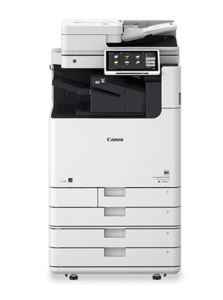
The Canon imageRUNNER resolves this issue. It is a high speed multi-function device that not only has a high rate of printing and a user-friendly interface, it can also connect to hand held devices to offer even more ease of use.

AESTHETIC

The care and attention to quality that you hold your business to is partly reflected in the business tools you are using. Looks certainly aren’t everything, but for clients and employees alike, it is definitely a point of reassurance. Taking pride in the appearance of your business tools boosts morale and assurance in the type of quality you are dedicated to providing. The Canon imageRUNNER Advance C250iF offers a sleek streamlined design that you will be very proud of.Remember that these are only a few things to consider when choosing the copier that’s right for you. Again, it certainly comes down to personal preference With the wide range of available choices, it can be difficult to make the right decision. It can also be very helpful to visit a trained professional who can help you find the right device for your business. Since 1972, Kirbo’s Office Systems has been doing just that. Call us today!

It’s official, we have a blog and know how to use it.

We have finally decided to take the plunge and add a blog to our site. We always wanted an easy way to share information with visitors and we’re super excited to start this journey. Keep coming back to our site and check for updates right here on the blog.